VPS vs Shared Hosting for Bloggers: Which Should You Choose? (2026)
When you start a blog, one of the first technical decisions you face is choosing your hosting. And two options come up again and again: shared hosting and VPS hosting.
For a new blogger, the difference can feel confusing. Both host your website. Both cost money. So which one do you actually need — and are you overpaying or underpowering your blog by choosing the wrong one?
Understanding VPS vs shared hosting for bloggers does not require technical expertise. Once you understand what each one is and who it is for, the right choice usually becomes clear.
This guide explains both options in simple terms, compares them honestly side by side, and helps you decide which fits your blog. Whether you are just starting out or your blog is growing fast, you will know exactly what to choose by the end — without paying for power you do not need or struggling with hosting that cannot keep up.
Quick Verdict: VPS vs Shared Hosting
If you want the short answer, here it is.
Choose shared hosting if:
- You are starting a new blog
- You have low to moderate traffic
- You want the most affordable option
- You prefer simplicity over control
Choose VPS hosting if:
- Your blog has grown and shared hosting feels slow
- You have higher or growing traffic
- You need more power and control
- You are comfortable with slightly more technical management
The simple rule: Most bloggers should start with shared hosting and move to VPS only when they genuinely outgrow it. Do not pay for VPS power you do not need yet.
Quick Comparison Table
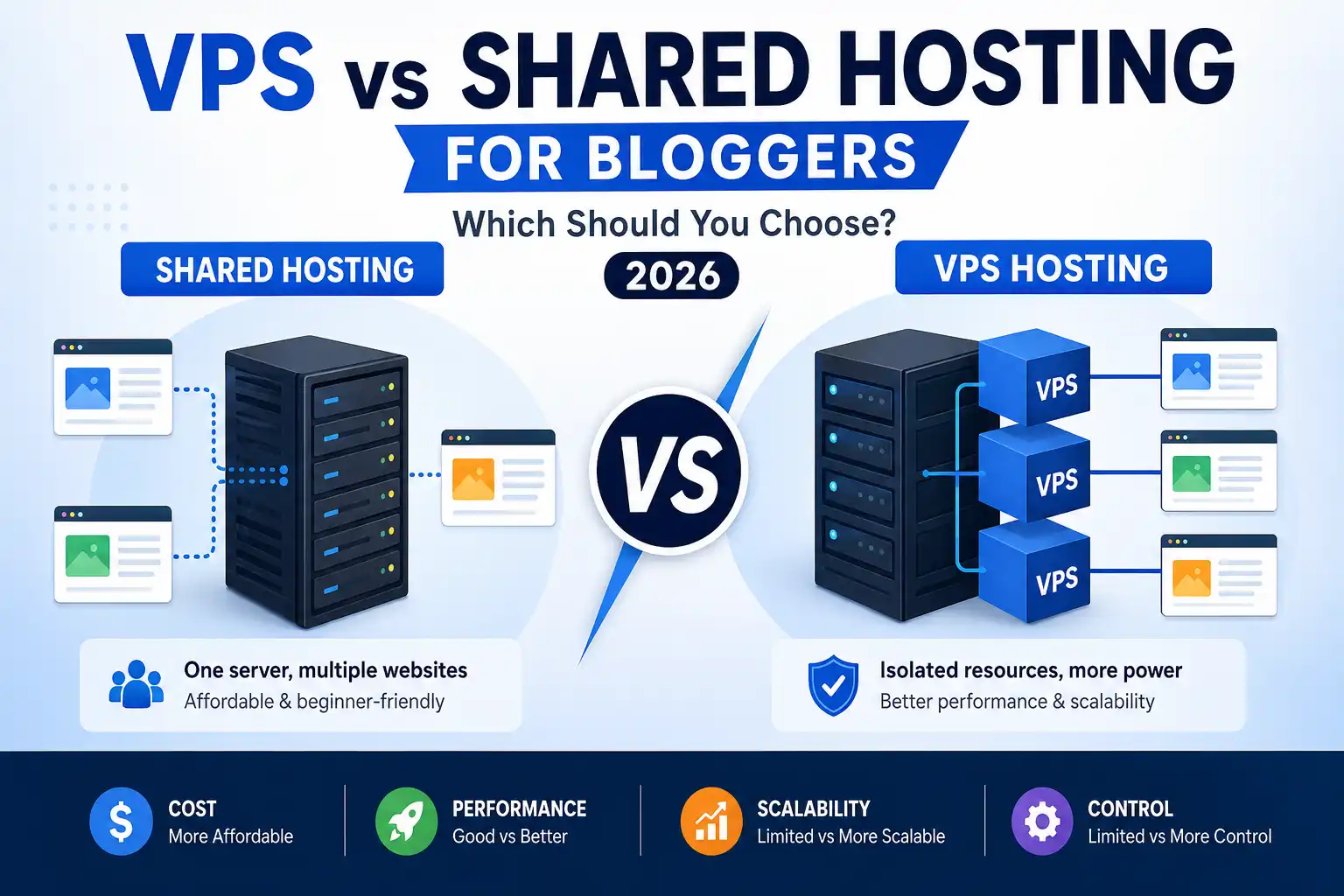
| Feature | Shared Hosting | VPS Hosting |
|---|---|---|
| Best for | New and small blogs | Growing and larger blogs |
| Cost | Most affordable | More expensive |
| Performance | Good for low traffic | Better for higher traffic |
| Resources | Shared with other sites | Allocated virtual resources for your site |
| Control | Limited | More control |
| Technical skill needed | Minimal | Moderate |
| Scalability | Limited | More scalable |
| Ease of use | Very beginner-friendly | Requires more knowledge |
⚠️ Pricing and features vary by provider and change over time. Always verify current details on each host’s official website.
What Is Shared Hosting?
Shared hosting is the most common and affordable type of web hosting. With shared hosting, your website shares a single server with many other websites.
Think of it like living in an apartment building. You have your own space, but you share the building’s resources — like water and electricity — with other residents. It is affordable because the cost of the server is split among many users.
For blogs, shared hosting works like this: your blog lives on a server alongside other blogs and websites, all sharing that server’s resources (processing power, memory, and storage).
Shared hosting is known for:
- Affordability — it is usually the lowest-cost mainstream hosting option for beginners
- Simplicity — it is beginner-friendly and easy to set up
- Convenience — the host manages the technical server details for you
- Ease of use — usually includes simple control panels and one-click installs
The trade-off: because you share resources, a traffic spike on another site on your server could occasionally affect your blog’s performance. How much this matters depends on the quality of the host, how many accounts are packed onto each server, and the resource limits of your plan. For low-to-moderate traffic blogs on a good host, this is often not a major issue — but on lower-quality, overcrowded servers, it can be more noticeable.
Shared hosting is the natural starting point for most new bloggers. It gives you everything you need to launch a blog without spending much or dealing with technical complexity.
What Is VPS Hosting?
VPS stands for Virtual Private Server. It is a step up from shared hosting that gives your site allocated virtual resources on a physical server shared with others, along with more control.
Using the housing comparison again: if shared hosting is an apartment, VPS is like owning a condo. You still share the building, but you have your own allocated space and reserved resources. VPS usually offers better resource isolation than shared hosting, but the exact level of isolation depends on the provider.
With VPS hosting, your blog gets an allocated portion of a server’s resources — processing power, memory, and storage reserved for your use. Even though the physical server is shared with other virtual servers, your slice is allocated to you.
VPS hosting is known for:
- Better performance — allocated resources mean more consistent speed
- More control — you can configure the server more to your needs
- Scalability — easier to add resources as your blog grows
- Reliability under load — handles higher traffic better than shared hosting
The trade-off: VPS hosting costs more than shared hosting and usually requires a bit more technical knowledge to manage. Some hosts offer “managed VPS,” where they handle the technical side for you — a good option for bloggers who want VPS power without the complexity.
VPS is the natural next step for blogs that have grown beyond what shared hosting comfortably handles.
Example Pricing and Popular Providers
To make this more concrete, here is a rough idea of what each hosting type typically costs, along with examples of well-known providers. These are illustrative examples, not endorsements or ranking claims.
Example Pricing
- Shared hosting: usually around $2–$10/month (introductory rates)
- Unmanaged VPS: usually around $5–$30+/month
- Managed VPS: usually around $10–$60+/month or higher
⚠️ These are general example ranges only. Actual pricing varies widely by provider, plan, and region — and renewal rates are often higher than introductory prices. Always check current pricing on each provider’s official website before deciding.
Popular Provider Examples
Shared hosting providers commonly used by bloggers include Hostinger and Namecheap. Both are widely known as affordable, beginner-friendly options for new blogs. Our Hostinger review and Namecheap review cover them in more detail.
VPS providers often used by more technical bloggers include DigitalOcean and Vultr. These are examples of cloud/VPS platforms known for flexible virtual server options, though they typically require more technical comfort than managed shared hosting.
These are examples to illustrate the market, not recommendations of which is “best” or “fastest.” The right provider depends on your specific needs, budget, and technical comfort — so compare current options and read independent reviews before choosing.
The Key Differences Explained Simply
Let us break down the main differences in plain language.
Resources
Shared hosting: You share resources with other sites. If they use a lot, less may be available for you.
VPS hosting: You get allocated virtual resources reserved for your site, generally providing more consistent availability than shared hosting, regardless of what other sites do.
Performance
Shared hosting: Good for low-to-moderate traffic. Performance can occasionally dip if other sites on the server are very busy.
VPS hosting: More consistent performance, especially under higher traffic, because your resources are reserved.
Cost
Shared hosting: The most affordable option, ideal for new bloggers on a budget.
VPS hosting: More expensive, but you get more power and control for the higher price.
Control
Shared hosting: Limited control — the host manages most technical settings.
VPS hosting: More control over server configuration, useful if you have specific needs.
Technical Skill
Shared hosting: Very beginner-friendly, minimal technical knowledge needed.
VPS hosting: Requires more technical comfort, unless you choose a managed VPS plan.
Scalability
Shared hosting: Limited room to grow before you need to upgrade.
VPS hosting: Easier to scale resources as your blog grows.
The pattern is clear: shared hosting prioritizes affordability and simplicity, while VPS prioritizes performance and control. Your choice depends on where your blog is in its journey.
VPS vs Shared Hosting: Pros and Cons
Here is an honest look at both options.
Shared Hosting
Pros:
- ✅ Most affordable hosting option
- ✅ Very beginner-friendly and easy to use
- ✅ Host manages technical details for you
- ✅ Usually includes helpful tools and one-click installs
- ✅ Perfect for new and small blogs
Cons:
- ❌ Shared resources can affect performance
- ❌ Limited room to scale as you grow
- ❌ Less control over server settings
- ❌ May struggle with high traffic
VPS Hosting
Pros:
- ✅ Allocated virtual resources with stronger isolation than shared hosting
- ✅ More consistent performance
- ✅ Better for higher and growing traffic
- ✅ More control and flexibility
- ✅ Easier to scale up
Cons:
- ❌ More expensive than shared hosting
- ❌ Usually requires more technical knowledge
- ❌ Can be more than a new blog needs
- ❌ Unmanaged VPS requires server management skills
The right choice is not about which is “better” overall — it is about which fits your blog’s current needs and budget.
Which Is Better for Your Blog?
The honest answer: it depends on your blog’s size, traffic, and stage. Here is a practical way to decide.
Shared Hosting Is Better If You Are:
A new blogger. If you are just starting, shared hosting gives you everything you need at the lowest cost. There is no reason to pay for VPS power before you have the traffic to need it.
Running a low-to-moderate traffic blog. If your blog gets modest traffic, shared hosting handles it comfortably.
On a tight budget. Shared hosting is the most affordable way to get your blog online and keep it running.
Wanting simplicity. If you prefer not to deal with technical server management, shared hosting keeps things simple.
VPS Hosting Is Better If You Are:
Running a growing blog. If your traffic has grown and shared hosting feels slow, VPS gives you the allocated resources to keep performing well.
Experiencing performance issues. If your blog is slowing down or struggling during traffic spikes on shared hosting, VPS can solve that.
Planning for serious growth. If you expect significant traffic growth, VPS gives you room to scale.
Comfortable with more control. If you want more control over your hosting environment (or choose managed VPS), VPS offers that flexibility.
For most bloggers, the journey looks like this: start with shared hosting, grow your blog, and upgrade to VPS when you genuinely outgrow shared hosting. This approach saves money early and gives you power when you actually need it. If you are still setting up your blog, our guide on how to start a blog walks through the basics.
When Should You Upgrade from Shared to VPS?
Many bloggers wonder when it is time to move up. Here are the common signs.
Your site is slowing down. If your blog loads slowly despite optimization, and you have ruled out other causes, shared hosting resources may be the limit.
You are getting more traffic. As your traffic grows, shared hosting may struggle to keep up. Growing traffic is a common reason to upgrade.
Traffic spikes cause problems. If your blog slows down or goes offline during traffic spikes, VPS’s allocated resources can handle these better.
Your host suggests an upgrade. Sometimes your hosting provider will notify you that you are using a lot of resources and suggest upgrading.
You need more control. If you have specific technical needs that shared hosting cannot meet, VPS gives you the control to address them.
A practical tip: Do not upgrade too early. Many bloggers upgrade to VPS before they need it, paying for power they do not use. Wait until you see genuine signs that shared hosting is holding you back. On the other hand, do not wait too long if performance problems are hurting your readers and SEO.
It is also worth knowing that many optimized blogs can stay on good shared hosting far longer than expected. Using caching, a lightweight theme, optimized images, and fewer plugins can significantly reduce the load on your hosting — often letting a well-tuned blog perform well on shared hosting even as it grows. Before assuming you need a VPS, it is worth optimizing your blog first, since good optimization can delay or even remove the need to upgrade.
Hosting and Your Blog’s SEO
Your hosting choice can affect your blog’s SEO, so it is worth understanding the connection.
Hosting can affect SEO indirectly through speed, uptime, and crawlability. Page speed and Core Web Vitals can influence search performance, but content quality and relevance remain stronger ranking factors. If shared hosting is making your blog slow, that can work against your SEO. VPS can help if performance is the issue — though a well-optimized blog on good shared hosting is often perfectly fine.
Uptime matters for crawling. If your blog goes down during traffic spikes, search engines may struggle to crawl it. Reliable hosting keeps your content available, which helps with indexing — including by AI crawlers.
Consistency supports SEO. Consistent performance and availability support your search visibility over time. Both good shared hosting and VPS can provide this at the right traffic levels.
The honest takeaway: hosting is one part of your SEO foundation. For most blogs, good shared hosting is enough. Upgrade to VPS if performance genuinely becomes a limiting factor. A strong grasp of technical SEO helps you make the most of whatever hosting you choose.
Common Mistakes Bloggers Make
Upgrading to VPS too early Many bloggers pay for VPS before they need it. If your blog is new or small, shared hosting is usually enough. Save your money until you genuinely outgrow it.
Staying on shared hosting too long The opposite mistake: sticking with shared hosting even when performance problems are clearly hurting your blog. If shared hosting is holding you back, it is time to upgrade.
Choosing hosting on price alone The cheapest option is not always the best value. Balance price with performance, reliability, and support.
Ignoring renewal prices Both shared and VPS hosting often have introductory prices that are higher at renewal. Always check the renewal price before committing.
Assuming VPS fixes everything VPS gives you more resources, but it will not fix a slow blog caused by other issues — like unoptimized images, too many plugins, or poor code. Optimize your blog first, then upgrade if needed.
Choosing unmanaged VPS without the skills Unmanaged VPS requires server management knowledge. If you are not technical, choose managed VPS or stick with shared hosting until you are ready.
Frequently Asked Questions
Q1: What is the difference between VPS and shared hosting?
Shared hosting means your website shares a server and its resources with many other sites, making it affordable but with shared resources. VPS (Virtual Private Server) hosting gives your site allocated virtual resources on a physical server shared with others, usually with better resource isolation and more control than shared hosting. This often provides more consistent performance, but the exact level of isolation depends on the provider. Shared hosting suits new and small blogs; VPS suits growing blogs that need more power.
Q2: Which is better for a new blogger — VPS or shared hosting?
For most new bloggers, shared hosting is the better choice. It is affordable, beginner-friendly, and provides everything a new blog needs. There is usually no reason to pay for VPS power before your blog has grown enough to need it. You can always upgrade to VPS later when your traffic and needs increase.
Q3: When should I upgrade from shared hosting to VPS?
Consider upgrading when your blog consistently slows down despite optimization, when growing traffic strains shared hosting, when traffic spikes cause performance problems, or when your host suggests it. The key is to upgrade when you see genuine signs that shared hosting is limiting your blog — not before you need it, and not so late that performance problems hurt your readers.
Q4: Is VPS hosting hard to use?
Unmanaged VPS hosting requires some technical knowledge to manage the server. However, many hosts offer managed VPS, where they handle the technical side for you. Managed VPS gives you the performance benefits of VPS without needing server management skills, making it accessible to non-technical bloggers who have outgrown shared hosting.
Q5: Does hosting type affect my blog’s SEO?
Yes, indirectly. Page speed and uptime are connected to SEO — if shared hosting makes your blog slow or unreliable, that can hurt your search performance. However, good shared hosting is perfectly fine for most blogs. Hosting is one part of your SEO foundation, but quality content and good optimization matter more. Upgrade to VPS only if hosting performance genuinely becomes a limiting factor.
Q6: Is VPS hosting worth the extra cost?
It depends on your blog’s needs. If your blog has grown and shared hosting is limiting your performance, VPS is worth the cost for the better performance and control. But if your blog is new or small, VPS is likely more than you need, and the extra cost is not justified yet. Match your hosting to your actual needs.
Q7: Can I switch from shared hosting to VPS later?
Yes. You can upgrade from shared hosting to VPS when your blog grows. Many hosts make this transition straightforward, and some offer migration support. This is why many bloggers start with shared hosting and upgrade to VPS when needed — it is a natural, manageable progression that saves money early and adds power when you require it.
Final Verdict
The VPS vs shared hosting decision comes down to a simple principle: match your hosting to your blog’s current needs, not to what you might need someday.
For most bloggers — especially new ones — shared hosting is the right starting point. It is affordable, simple, and provides everything a new or small blog needs. There is no benefit to paying for VPS power before your blog has grown enough to use it.
VPS hosting becomes the right choice when your blog outgrows shared hosting — when growing traffic, performance issues, or the need for more control mean shared hosting is holding you back. At that point, VPS gives you the allocated resources and flexibility to keep performing well.
The smartest path for most bloggers is clear: start with shared hosting, grow your blog, and upgrade to VPS when you genuinely need it.
Here is where to start:
1. If you are new, choose shared hosting. It gives you everything you need at the lowest cost and complexity.
2. Watch for signs you have outgrown it. Slow loading, growing traffic, and performance issues are the signals to consider upgrading.
3. Upgrade to VPS when you genuinely need it. When shared hosting is limiting your blog, VPS gives you room to grow — choose managed VPS if you want to avoid technical complexity.
Choose based on where your blog actually is today, keep your content genuinely valuable, and you will have the right hosting foundation to grow your blog successfully.
Disclaimer: Hosting features, pricing, and performance vary between providers and change over time. The guidance in this article reflects general best practices as of 2026 and does not endorse any specific provider. Always verify current pricing, features, and terms on each host’s official website, and read independent reviews before choosing. Hosting supports but does not guarantee blogging success.
Sources and Further Reading
Helpful Resources
- Hostinger Review — totalinfohub.com/hostinger-review/
- Namecheap Review — totalinfohub.com/namecheap-review/
- How to Start a Blog — totalinfohub.com/how-to-start-a-blog/
- Technical SEO Guide — totalinfohub.com/technical-seo-beginner-to-advanced-guide/
- How AI Crawlers Read Your Website — totalinfohub.com/how-ai-crawlers-read-your-website/
- Best WordPress Themes for Bloggers — totalinfohub.com/best-wordpress-themes-for-bloggers/