On Page SEO: The Complete Beginner’s Guide to Rank Higher in Google (2026)
Alright, let’s be honest for a second.
You spend hours, maybe even days, pouring everything into a piece of content you know is awesome. You hit publish, and then… crickets. You check your rankings a week later, and there it is, stuck on page ten of Google—a place where good content goes to die. We’ve all been there. You see competitors snagging the top spots and can’t help but wonder, “What am I doing wrong?”
The secret? It’s not some ridiculously complex formula or a crazy-expensive tool. The real difference-maker, the one thing you have 100% control over, is something called on page SEO.
Forget the official jargon. Think of it like this: your website is a fantastic book, but Google is a library with millions of others. If you just hand the librarian your book with a blank cover and a messy table of contents, where’s it going to end up? Probably some dusty, forgotten corner.
This is where on page SEO comes in. It’s you, giving your book a magnetic title and a summary that pulls people in. The goal is to make your content’s purpose so crystal clear that Google can’t help but understand who it’s perfect for.
And let’s be real, ranking in 2026 is a different beast. AI Overviews are changing everything, and the competition is only getting fiercer. In this world, solid on page SEO isn’t just a “nice-to-have”—it’s the ground floor of your entire online strategy. If you need proof, just look at Semrush. They slap our keyword, “on page SEO,” with a tough 70 difficulty score for a reason. But these are the same fundamentals the pros use to compete and win in tough niches.
That’s why this guide is different. In what we believe is the most complete beginner’s guide available, we’re skipping the fluff and overly technical language. We’re just breaking down the exact, actionable strategies—with simple checklists and real-world examples—that will show you how to rank higher and take your content from invisible to unmissable.
Let’s break down on page SEO step by step—and turn your content into something Google can’t ignore.
Chapter 1: What Is On-Page SEO and Why It Matters in 2026?
Alright, let’s get one thing straight about on page SEO. It’s not some mythical, complex beast. It’s the stuff you can actually control, and honestly, it’s where you get the most bang for your buck.
1.1 On Page SEO Isn’t Just About Keywords Anymore
When you boil it all down, on page SEO is every single move you make on a webpage to show Google that your content is the best answer to what someone is searching for.
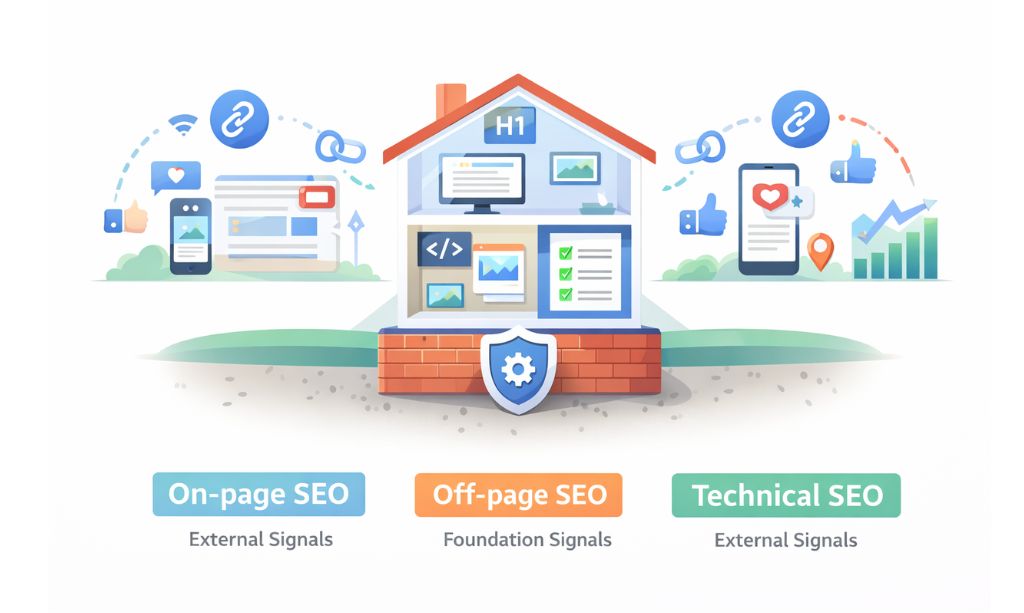
Think about your website like it’s a house you just built.
The foundation and wiring? That’s your Technical SEO. If that’s a mess, nothing else matters.
Your reputation in the neighborhood—what other people are saying about you? That’s Off-Page SEO.
And on page SEO? That’s everything inside. The furniture, the signs on the doors, the way you’ve organized the kitchen. It’s what makes someone walk in and immediately know they’re in the right place.
Years ago, the game was to stuff your main keyword into a page a hundred times. That strategy is dead. Today, a good on page SEO strategy is about creating a page that people genuinely find useful and that search engines can easily understand.
1.2 The SEO Trio: On-Page, Off-Page, and Technical
These three things get jumbled up all the time, but they have different jobs. Before we break down the three core pillars of modern SEO, it’s helpful to understand the broader concept of Search Engine Positioning, which is all about increasing a website’s visibility in search results. These three pillars are the foundation of how that positioning is achieved.
To make it super clear, let’s break them down:
- On Page SEO: This is everything you do on the page itself—the writing, the headlines, the images, how you link to your other articles. The best part about on page SEO? You’re in complete control.
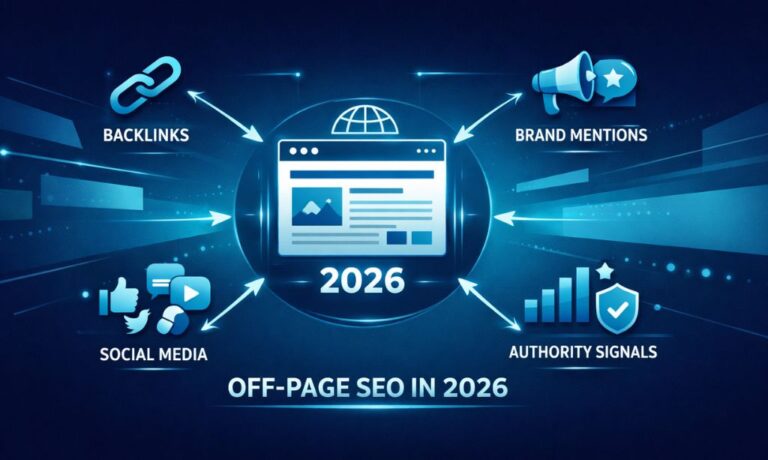
- Off-Page SEO: This is the chatter about you that happens off your site. It’s mostly about getting other credible sites to link to you. You can create great stuff to encourage this, but you can’t force anyone to talk about you.
- Technical SEO: This is the engine room stuff hiding under the hood. It’s your site’s speed, whether it works on phones, and all the backend work that lets Google’s bots crawl your site without getting stuck.
Here’s the hard truth: You can have a perfect engine and a stellar reputation, but if your house is a mess inside (that’s your on page SEO), nobody’s sticking around. It all starts with the page.
1.3 Does On Page SEO Still Matter with All This AI Stuff?
I hear this a lot. I often hear a version of this thought: “Shouldn’t a super-intelligent AI be able to find the best content on its own, without me needing to do all these optimizations?”
That thinking is completely backward. It matters more than ever.
The old game was about finding loopholes in the algorithm. The new game is about making your content’s value painfully obvious. Google’s AI is smart, but it’s a machine that thrives on clear signals. Good on page SEO is how you give it those signals. A well-structured, user-friendly page tells the AI that people are going to have a good experience here. When you cover a topic inside and out, you’re telling the AI you’re an expert.
Don’t try to outsmart the AI. Just use solid on page SEO to show it you’ve got the goods.
1.4 Using On Page SEO to Prove You’re the Real Deal (E-E-A-T)
If you’re serious about ranking, you need to know about E-E-A-T. It’s Google’s framework for judging content quality. So, what does E-E-A-T actually mean? It’s a checklist for these four qualities: Experience, Expertise, Authoritativeness, and Trustworthiness.
Basically, Google is asking: “Can we trust this?”
Your on page SEO is how you prove the answer is “yes.” You show Experience with real stories and examples. You show Expertise with content that’s ridiculously thorough. You build Trust by being transparent and citing good sources. Every little on page SEO tweak you make should be helping build that sense of trust and authority.
1.5 A Quick Reality Check
Look, on page SEO is a powerhouse, but it’s not a magic pill.
It’s your ticket to get into the game. It puts you on the field, ready to play. But it can’t make up for a terrible product or a website that looks like it was designed in 1998. It won’t build a brand overnight, and it won’t replace the authority that comes from high-quality backlinks.
But without it? You’re not even in the game. You’re just a face in the crowd.
Now that we’ve cleared that up, let’s get our hands dirty with the first real task: finding the right keywords.
Chapter 2: Keyword Research for On Page SEO: The Foundation of Visibility
Okay, let’s talk keywords. If your content is the car, then keywords are the fuel. But most people get this part wrong. They think keyword research is about finding words to stuff into a page.
It’s not. It’s about getting inside your ideal customer’s head. It’s about figuring out the exact phrases they use when they’re looking for answers, and then building your content around that language.
Nail this, and your on page SEO efforts will actually work. Mess it up, and you’re just writing into the void.
2.1 Forget Keywords for a Second, Think Intent
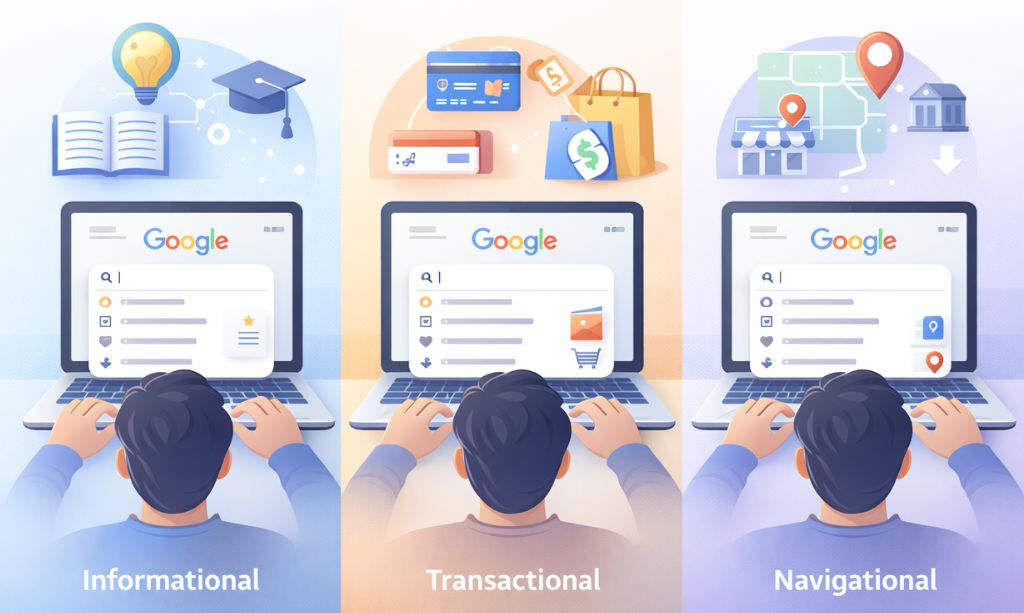
If you only take one thing away from this chapter, let it be this: Stop obsessing over what people search for and start obsessing over why. And that “why” is the secret sauce. In the SEO world, we call it user intent.
Google’s whole business model is based on giving people exactly what they want, fast. If your page does a bad job of that, it’s going to get buried. If you help Google solve the user’s problem, you win. It’s that simple.
Think about it. Someone searching for “best running shoes” is in a different mindset than someone searching for “how to tie running shoes.” One is ready to shop, the other just wants a quick tutorial. If you write a long blog post for the person who wants to buy, you’ve failed. Your on page SEO can be technically perfect, but you’re bringing the wrong tool to the job. It’s like bringing a screwdriver to hammer a nail.
So before you ever decide on a keyword, ask yourself: “What is this person really trying to do right now?”
2.2 The Tools You Actually Need (Not a Million of Them)
First off, you don’t need a wallet-busting subscription to a dozen different tools. Honestly, you can get a huge amount done with just the basics.
- Google Keyword Planner: It’s Google’s own tool, and it’s free. The data comes straight from the source, but they don’t give you all the juicy details. It’s great for getting some initial ideas, but that’s about it.
- Semrush / Ahrefs: These are the big guns. They’re not cheap, but they’re an investment. They let you spy on your competitors, see exactly what keywords they rank for, and find opportunities they’ve missed. If you’re serious about this stuff, you’ll eventually want one of them.
- Ubersuggest: This is the happy medium. It has a pretty generous free version, and its paid plans won’t make you cry. It’s a solid choice for most people starting out.
- AnswerThePublic: This thing is a goldmine for blog post ideas. It takes your topic and shows you all the questions people are typing into Google about it. It’s less about data and more about understanding what people are curious about.
My advice? Don’t get overwhelmed. Start with Google Keyword Planner and the free version of Ubersuggest. Play around with them. It’s more than enough to find some golden opportunities.
2.3 Long-Tail Keywords: Your Secret Weapon
Every beginner does this: they try to rank for huge, one-word keywords like “marketing” or “insurance.” Trying to rank for those is a complete bloodbath. You’re competing against massive companies with endless budgets.
The smart money is on long-tail keywords. These are just longer, more specific phrases.
Think about the difference between someone searching for “coffee” and someone searching for “best burr grinder for french press.” That first person could be looking for anything. But that second person? They know exactly what they want. They are deep into the buying cycle and looking for that final piece of information.
These long-tail searches are the foundation of a good on page SEO strategy. The traffic is smaller, but it’s way more targeted. You’re not shouting into a crowd; you’re having a direct conversation with someone who needs your help.
2.4 Topic Clusters: How to Show Google You’re an Expert
Here’s another key idea for modern on page SEO. Google is smart. It doesn’t just see keywords; it understands topics. The best way to play this game is to build what’s called a “topic cluster.”
It’s simpler than it sounds. You basically build a mini-library on your site for a topic you want to own. You start with one massive, ultimate guide on a broad topic (like “on page SEO”), which acts as your Pillar Page. From there, you write a bunch of smaller, focused articles on specific parts of that topic (like “title tags” or “image SEO”)—these become your Cluster Pages.
By linking all those smaller articles back to that main guide, you’re creating an interconnected web of information. That structure basically tells Google that you haven’t just touched on a subject, you’ve covered it inside and out. This is how you build real authority and start to compete for those tougher keywords.
2.5 Mapping Keywords to Your Pages
So you’ve got your keywords, and it’s time to put them to work by assigning them to pages.
Here’s the rule of thumb: one main keyword per page. That’s it. Don’t try to cram five keywords onto one page; you’ll just confuse Google and rank for none of them.
Your main keyword is the star of the show, but it needs a supporting cast. Sprinkle in other related phrases and questions people might ask. If your main keyword is “on page SEO basics,” you’d naturally also talk about “on page optimization,” “what to include on a page,” etc.
Think of keyword research as a living, breathing part of your strategy, not a one-and-done task you check off a list. It’s about constantly listening to what your audience is looking for. But if you nail the basics of intent, long-tails, and topic clusters, your on page SEO will be built on rock-solid ground.
Now, with our keywords in hand, let’s talk about the fun part: actually writing the content.
Chapter 3: Crafting Compelling Content: The Heart of Your On Page SEO Strategy
Alright, you’ve done your keyword research. You have a solid idea of what your audience wants and why they want it. Now comes the most important part—the part that no technical trick can ever replace: creating the actual content.
Let’s be brutally honest: all the on page SEO tweaks in the world won’t help a page with bad content. If your content is boring, unhelpful, or hard to read, people will leave, and Google will notice.
Great content is the engine of your entire SEO strategy. In this chapter, we’re going to build that engine, piece by piece.
3.1 Quality First: Why “Thin Content” is an On Page SEO Killer
We’ve all seen it. You click a promising link, only to find a page with three generic paragraphs that say absolutely nothing of value.
That, my friend, is “thin content.”
Thin content is the enemy of good on page SEO. It’s content that offers little to no real value to the reader. It might have the right keywords, but it fails the most important test: it doesn’t solve the user’s problem. Google’s algorithms are specifically designed to find and bury this kind of content. Why? Because it leads to a bad user experience, and that’s bad for Google’s business.
Your goal is the opposite: create “thick content.” Content that is comprehensive, genuinely helpful, and leaves the reader feeling satisfied and informed.
3.2 Engaging Introductions and Conclusions: The Hook and the Handshake
How many times have you clicked on a link, read the first two sentences, and immediately hit the “back” button?
Your introduction is your one shot to convince a reader to stick around. A good intro does two things:
- It acknowledges the reader’s problem and shows you understand their frustration.
- It promises a clear solution and sets the stage for what they’re about to learn.
Your conclusion is just as important. It’s your final handshake. Don’t just let your article fizzle out. A strong conclusion should:
- Briefly summarize the key takeaways.
- Prompt the reader with a clear next action. What is their immediate next move? Guide them.
3.3 Headings and Subheadings (H1, H2, H3): Your Content’s Blueprint
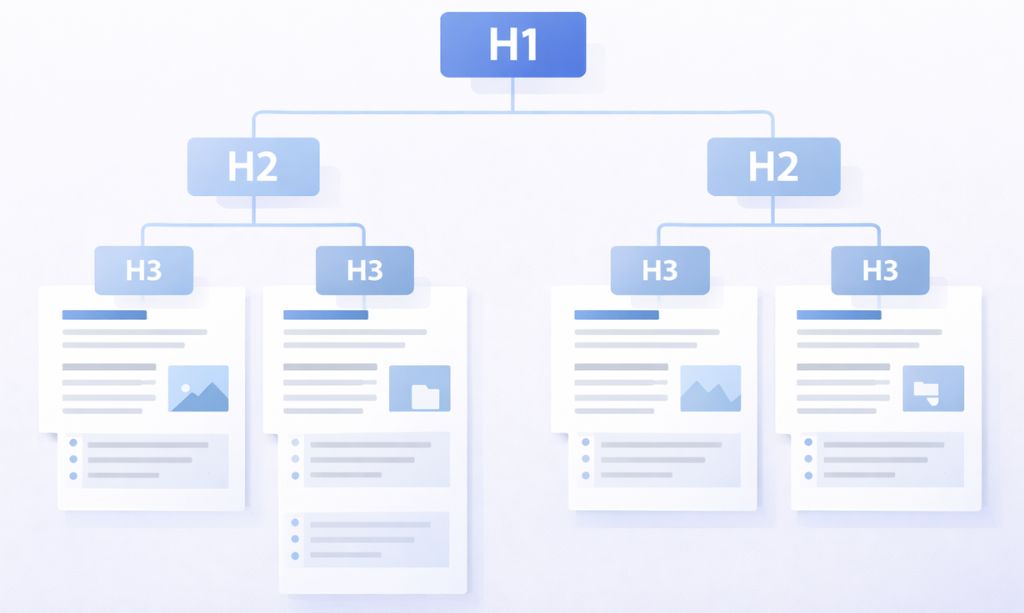
Nobody reads articles on the internet from top to bottom. They skim.
Headings are the signposts that guide skimmers through your content. They break up giant walls of text and create a logical structure. Here’s the simple hierarchy:
- H1 Tag: This is your main title. As a rule of thumb, you should only have one H1 per page. It’s the title of the book.
- H2 Tags: These are your main sub-topics. Consider these the chapters of your book. Our chapter titles in this guide (like “3.3 Headings and Subheadings…”) are H2s.
- H3 Tags (and H4s): These are sub-points within your H2 sections. They help you break down complex ideas even further.
Using headings properly does two amazing things for your on page SEO: it makes your content scannable and user-friendly for humans, and it gives Google a perfect, structured outline of your content.
3.4 Natural Keyword Integration: The Art of Not Stuffing
The golden rule of using keywords is simple: Write for humans first, then tweak for Google.
Keyword stuffing—the old practice of awkwardly forcing your keyword into every other sentence—will get you penalized. Instead, the goal is to weave your keywords into your sentences so they feel like a natural part of the conversation.
As a general guideline, try to have your main keyword appear in your H1 title, somewhere in the first paragraph, and in a subheading or two.
After that, just write naturally. If you’re covering the topic well, your keyword and its variations will appear organically. Don’t force it. If a sentence sounds robotic when you read it aloud, you’ve gone too far.
3.5 LSI Keywords and Related Terms: Sounding Like an Expert
Don’t let the term “LSI Keywords” (Latent Semantic Indexing) throw you off. It’s simply a technical name for words and phrases that are contextually related to your main keyword.
For instance, anyone writing a deep dive on “on page SEO” would almost certainly bring up things like “title tags,” “headings,” and “user experience.” Google’s AI expects to see these related ideas.
When you include these terms, you’re signaling to Google that your content is comprehensive. It shows you’re not just repeating a keyword, but actually exploring the topic in depth, just like an expert would.
3.6 Content Length and Depth: The “As Long as It Needs to Be” Rule
If there’s one question that dominates SEO forums, it’s this: “How long does my article need to be?”
The honest (and slightly annoying) answer is this: it needs to be long enough to completely solve the reader’s problem.
Forget magic numbers. You might have noticed that longer articles often do better in search. That’s usually because they’re more thorough and valuable, not just because they’re long.
The key is value, not fluff. Your goal isn’t to hit a word count; it’s to create the go-to resource on the internet for that specific query.
3.7 Readability: Making Your Content Easy to Read
You could have the most brilliant information in the world, but if it’s trapped in a giant wall of text, nobody will bother reading it.
Readability is a huge piece of on page SEO. So, make your writing scannable and easy on the eyes. Short sentences. Short paragraphs. Bullet points. Bolded text. Paying attention to these small details can have a massive impact.
When your content is a breeze to get through, people stick around longer, and that’s a huge positive signal to Google.
3.8 Incorporating Multimedia: Breaking Up the Text
Look, images and videos aren’t just for decoration; they’re vital on page SEO tools. They make your content less intimidating, clarify complex points, and get people to stay on your page longer. What’s not to love?
Plus, every image is a new chance to optimize. Make sure your image file names are descriptive (e.g., on-page-seo-checklist.jpg instead of IMG_12345.jpg) and always use descriptive alt text, which we’ll cover in the next chapter.
3.9 Matching Content with Search Intent (The Final Check)
We talked about intent in the last chapter, but it’s so important it deserves a second mention.
Before you finalize your content, go back to Google. It’s time to spy on the competition. Go pop your main keyword into Google and actually study the pages that are currently winning.
- Are they blog posts?
- Are they product pages?
- Are they videos?
- Are they “how-to” guides or “list” articles?
Google is literally showing you the type of content it wants to rank for that query. Don’t try to reinvent the wheel. If the top 10 results are all ultimate guides, you should probably create an ultimate guide. Match the format that’s already winning.
Now that you know how to create amazing content, let’s look at the more technical, behind-the-scenes elements you need to get right. In the next chapter, we’re diving into HTML elements.
Chapter 4: Optimizing Your HTML Elements: Stage Directions for Google
So you’ve poured your heart into creating an amazing piece of content. That’s awesome. But how does Google know what the most important parts are? How does it tell the difference between a title and a random sentence?
That’s where a few basic HTML elements come in.
Think of them as stage directions for Google. They’re simple, behind-the-scenes instructions that tell Google exactly how to “read” your content. And getting them right is a huge part of good on page SEO. Don’t worry, you don’t need to be a coder for any of this.
4.1 Title Tags: Your Google Billboard
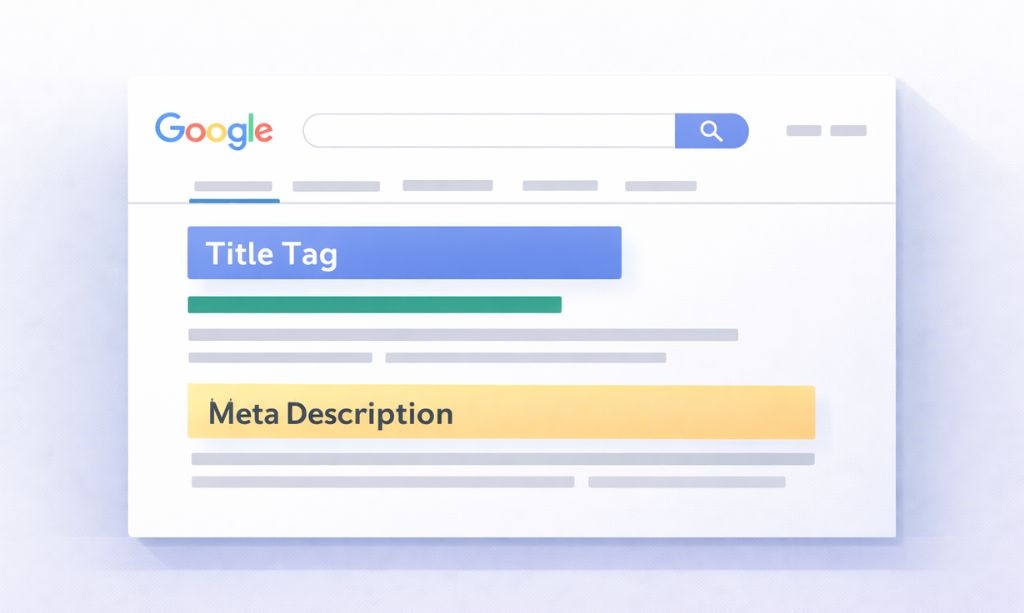
If you only pay attention to one thing in this chapter, make it this. The title tag is the blue, clickable headline that pops up in Google’s search results.
It’s not just a technical thing; it’s your first—and maybe only—chance to grab someone’s attention. A dull title is an invisibility cloak; people’s eyes will slide right past it, even at the coveted #1 spot.
So how do you write a good one?
- Keep it brief. You’ve got about 50-60 characters before Google chops it off.
- Put your keyword up front. It tells Google and the user right away what the page is about.
- Make it interesting. Use numbers, ask a question, or promise a benefit.
Let’s look at a quick makeover:
- Before: SEO Tips Article
- After: 10 On Page SEO Tips to Instantly Boost Your Rankings | TotalInfoHub
The second one just makes you want to click, right? That’s the goal.
4.2 Meta Descriptions: The Ad Under the Billboard
The meta description is that little chunk of text under the title in the search results.
Here’s a fun fact: meta descriptions don’t directly help you rank. Google doesn’t care what keywords are in there. So why do we bother?
Because people do. A good meta description acts like a free mini-advertisement. It’s your chance to tell someone why your page is the one they should click on.
Here’s the formula:
- Keep it to about 160 characters.
- Talk directly to the searcher. What’s in it for them?
- Include your keyword. Google usually makes it bold, which helps your link stand out.
Imagine the difference:
- Before: This article talks about a lot of on page SEO strategies. You can learn about them here.
- After: Ready to master on page SEO? This guide gives you actionable, step-by-step tips to improve your rankings. Learn the secrets here!
4.3 URLs: Keep ’em Clean
The URL, or web address, is another small signal for your on page SEO. A messy, confusing URL is bad for both people and search engines.
The best URLs are short, simple, and easy to read.
- Bad URL: totalinfohub.com/p?123-article-final_v2
- Good URL: totalinfohub.com/on-page-seo-basics
Just use your main keyword, separate the words with hyphens (-), and keep it all lowercase. Simple.
4.4 Header Tags: Your Content’s Outline
We talked about headers in the last chapter, but they’re technically HTML, so they belong here too. Just remember the big rule: one H1 tag per page. It’s your page’s main headline. H2s are for your main sections, and H3s are for the sub-points inside those sections. It’s really just a way to keep your content neat and easy for readers to follow.
4.5 Image SEO: Helping Google See
Google is a genius, but it’s basically blind to images. It can’t “see” what’s in a photo; you literally have to spell it out for them.
You do this in two key ways:
- File Name: Before you even upload your image, give it a simple, descriptive name. Instead of IMG_7890.jpg, call it on-page-seo-checklist.jpg.
- Alt Text: This is a brief description you add to the image after uploading. It’s mainly for screen readers, but Google uses it to figure out what the image is about.
One last thing: make sure your images aren’t gigantic files. Big, heavy images are a primary cause of slow-loading websites, and that’s an SEO killer right there.
4.6 Schema Markup: The Secret Language of SEO
Okay, this one sounds complicated, but it’s not. Basically, schema is you, whispering in Google’s ear exactly what your content is about, so there’s no confusion. It’s just a special code that provides more context about your content.
It’s like giving Google a pre-filled form with all the important info, so it doesn’t have to guess.
When you use schema, Google might give you cool “rich snippets” in the search results, like star ratings, FAQs, or event times. These make your listing bigger and more eye-catching.
But perhaps the best part is that you can leave your coding fears at the door. Modern SEO plugins do all the heavy lifting for you. You just fill in a few boxes.
Now that we’ve put all the right “stage directions” in place, it’s time to think about the audience’s experience. In the next chapter, we’ll dive into why a user-friendly site is a high-ranking site.
Chapter 5: User Experience (UX) and On-Page SEO: The Symbiotic Relationship
Let’s be honest, the difference between a website you love and a website you instantly hate often has little to do with the words on the page.
It’s about the feeling.
Does the site feel fast and effortless, or is it clunky and frustrating?
And here’s the secret for 2026: Google is obsessed with that feeling. Think of Google as a recommendation engine. If it sends someone to your site and they have a miserable time, it reflects badly on Google. That’s why they’ve stopped just analyzing your content and started analyzing the experience of using your content.
This entire concept—the feeling, the usability, the flow—has a name: User Experience, or UX. And it’s no longer a side dish to your on page SEO; it’s the main course.
Mastering the principles in this chapter isn’t just about making your site ‘nice’; it’s about sending some of the most powerful ranking signals you possibly can.
5.1 Page Speed: The Need for Speed (Seriously)

Think about the last time a website felt like it was loading in slow motion. Of course you have.
In the digital world, speed is the ultimate currency.
Picture this: you’re excited to visit a new cafe you’ve heard about. You get there, but there’s a ridiculously long line snaking out the door. Are you waiting? Probably not. You’re going to the cafe next door.
A slow website is that long line. It’s the biggest barrier between you and your audience. This isn’t just a small annoyance; it’s a critical user experience signal that Google pays very close attention to.
To standardize how they measure this, Google created what you can think of as a “speed test” for your pages, called Core Web Vitals. Don’t worry about the technical jargon. They’re basically just checking:
- How fast does the main content load?
- How quickly can someone actually use the page?
- Does the page jump around while it’s loading?
While speed optimization can get complex, you can solve most of your problems by focusing on two key areas: making your images smaller and choosing a reliable web host.
5.2 Is Your Site Mobile-Friendly? (Hint: It Better Be)
Take a look around you. The majority of people browsing the web are doing it on their phones.
Because of this, Google now uses “mobile-first indexing.” This means it primarily looks at the mobile version of your website to determine its rankings. If your site looks great on a desktop but is a jumbled mess on a phone, your rankings will suffer. Period.
Your website design needs to be responsive, meaning it automatically adjusts to fit any screen size. There’s no excuse for a bad mobile experience in 2026.
5.3 Internal Linking: Don’t Leave Your Readers at a Dead End
Think of internal links as the hallways of your website; they connect all your rooms (pages) together and guide visitors where to go next.
Think about it from a user’s perspective. They just finished reading your awesome blog post. What should they do next? If there are no links to guide them, they’ll probably just leave.
Good internal linking creates pathways for your users to explore more of your content. It’s like saying, “Hey, if you found this interesting, you’re going to love this other thing I wrote.” This keeps people on your site longer, which is a fantastic signal to Google. It’s a fundamental part of good on page SEO.
5.4 Advanced Internal Linking: Building a “Content Hub”
Ready to take it up a notch? Use internal links to build a Topic Cluster (like we talked about in Chapter 2).
When you create a massive “Pillar Page” on a topic and then strategically link to it from all your smaller “Cluster Pages,” you’re not just helping users—you’re showing Google that you have a deep, well-organized library of information on that subject. This is how you build authority and signal that you’re an expert.
5.5 External Linking: Proving You’ve Done Your Homework
This one seems weird to beginners. Why would you send people away from your website?
Consider it the online version of a bibliography; you’re showing you’ve done your homework. When you link out to other high-quality, authoritative websites to back up a claim or provide more information, you’re showing Google that your content is well-researched and trustworthy.
You’re not just making stuff up; you’re part of a larger conversation. This builds trust, which is a key component of E-E-A-T and a subtle but important part of on page SEO.
5.6 Site Navigation and Information Architecture
In simple terms, this is all about one question: Can people find what they’re looking for on your site without getting a headache?
Your site’s main navigation menu should be simple, logical, and clear. A user should be able to land on your homepage and understand exactly where to go to find what they need within a few seconds. If they have to click around through confusing menus, they’ll get frustrated and leave.
5.7 Formatting for Skimmers: How to Make Your Content a Joy to Read
We covered this in the content chapter, but it’s a UX principle at its core. How you format your text directly impacts the user experience.
Just look at the difference:
- Before: A giant, intimidating paragraph with long sentences and no formatting.
- After: The same information, but broken up with short paragraphs, clear headings, and bullet points.
The “After” version is infinitely easier to read. Making your content scannable respects your reader’s time and keeps them engaged.
5.8 User Engagement Metrics: How Google Measures Happiness
How does Google know if people are having a good experience on your site? It watches their behavior.
Two key metrics to understand are:
- Dwell Time: This is the amount of time a person spends on your page after clicking on it from the search results. A longer dwell time suggests they found your content valuable.
- Bounce Rate: This tells you what percentage of your visitors are “one-and-done”—they look at one page and then bolt. A high bounce rate can sometimes signal that your page didn’t match their search intent.
Every single UX factor we’ve discussed—from page speed to formatting—is designed to improve these engagement metrics and prove to Google that your site is the best result.
Now that your site is a well-oiled, user-friendly machine, let’s look at some of the more advanced techniques that can give you a real competitive edge.
Chapter 6: Advanced On Page SEO Techniques for 2026 and Beyond
Alright, you’ve mastered the fundamentals. Your content is solid, your HTML is clean, and your site is user-friendly. You’re already ahead of 90% of your competition.
But what about that top 10%? What are they doing differently?
They’re using the strategies we’re about to cover. And here’s a secret: they aren’t necessarily harder, they just require you to think about SEO in a new way. This is how you go from just ranking to truly dominating your niche.
6.1 The Big Shift: Thinking in Topics (Not Just Keywords)
This is the future, and it’s already here. Google’s brain, called the “Knowledge Graph,” doesn’t just see a keyword like “steve jobs.” It understands that Steve Jobs was a person (an entity), who founded (a relationship) Apple Inc. (another entity).
This is Semantic Search. Google is no longer a simple dictionary; it’s an encyclopedia that understands how things are connected.
So what does this shift mean for your on page SEO strategy?
You need to show Google that you’re an authority on the entire topic, not just a single keyword. You do this by:
- Answering related questions within your content.
- Clearly defining who, what, and where you are (e.g., having a detailed “About Us” page).
- Structuring your site with Topic Clusters (like we discussed).
Your ultimate goal is to become a trusted “entity” in your niche that Google relies on for good information.
6.2 A Frank Talk About AI in Your SEO Workflow
Look, AI isn’t going anywhere. And here’s the deal: you can either see it as a threat that’s coming for your job, or you can see it for what it is: the most powerful research assistant ever invented.
I use AI tools every single day in my on page SEO work, but never to write a single final sentence.
Think of it this way: AI is brilliant at the grunt work. It can instantly analyze the competition and tell you what topics you need to cover. It can dig up dozens of questions people are asking that you would’ve spent hours searching for. It can even help you structure your article.
But it has no soul. It has no stories. It has no terrible first-hand experiences that taught you a valuable lesson.
That’s your job.
So let AI build the scaffolding for your article. Let it do the boring research. But when it’s time to actually speak to your reader, make sure it’s your voice they hear.
6.3 Voice Search: Write Like You Talk
“Hey Google, what’s the best way to do on page SEO?”
That’s not a search query from the future; it’s happening in millions of homes and cars right now. Voice search is no longer a gimmick, it’s a habit. And optimizing for it isn’t some complex technical hack.
It’s actually quite simple: write your content the way people talk.
Think about it. Nobody picks up their phone and says, “best on page SEO techniques cheap.” They ask a full question, just like they would ask a friend. Your job is to format your content to be the perfect answer to that spoken question.
Here’s how you do it:
- Structure your articles around questions. Use actual questions people would ask as your subheadings.
- Answer the question immediately. Right under that subheading, provide a short, direct, and clear answer.
- Embrace the FAQ. A dedicated Frequently Asked Questions section at the end of your post is a goldmine for capturing voice search traffic.
Basically, if you make your content easy for a human to scan and find a quick answer, you’re already 90% of the way to optimizing for voice search.
6.4 International SEO: Directing Global Traffic
If your website targets audiences in multiple countries and languages, you have a specific on page SEO task: you need to play matchmaker between your content and your visitors.
You can’t just hope Google figures it out. You need to provide clear instructions using a piece of code known as a hreflang tag.
This tag essentially tells search engines, “For this URL, the Spanish-language equivalent is over here, and the German-language version is over there.”
Implementing this correctly is critical. It prevents your own pages from competing against one another for rankings and ensures a visitor from Mexico City doesn’t land on a page meant for someone in Berlin.
The good news is that if you’re using a reputable WordPress plugin for multilingual sites, this complex implementation is usually handled automatically in the background.
6.5 Targeting SERP Features: More Than Just Blue Links
The Google search results page (SERP) isn’t just a list of ten blue links anymore. It’s filled with “SERP features” like:
- Featured Snippets: Think of this as the “trophy case” at the top of the page, showcasing the best direct answer.
- People Also Ask (PAA): The dropdown box of related questions.
- Video Carousels, Image Packs, etc.
You can optimize your on page SEO to win these spots. The strategy is often the same as for voice search: ask a question in a heading and answer it clearly and concisely right below. Using lists and tables in your content can also help you get featured.
6.6 Content Freshness: Don’t Let Your Content Get Stale
Would you trust a guide to “The Best Smartphones of 2018”? Of course not.
Content freshness is a real ranking factor. Google wants to provide its users with up-to-date information. If your content is old and dusty, it can slowly lose its rankings over time.
Make it a habit to go back and update your most important articles every 6-12 months.
- Update any outdated stats or information.
- Add new sections to cover recent developments.
- Check for and fix any broken links.
6.7 Local On-Page SEO: Winning Your Neighborhood
If you’re a local business (like a plumber, restaurant, or dentist), your on page SEO needs a local flavor.
This means signaling to Google where you operate. You do this by including your city, state, and neighborhood in key places on your website:
- In your title tags.
- In your headings.
- In your body content.
- By embedding a Google Map.
- By creating location-specific pages.
6.8 Optimizing for AI Overviews (The New Frontier)

This is the big one for 2026. AI Overviews (formerly SGE) are the AI-generated answers that Google is increasingly showing at the top of the search results.
How do you get your content included in these?
There’s no magic button. The AI’s job is to synthesize the most reliable information from the web. Your job is to be that reliable information. Everything we’ve discussed—E-E-A-T, great structure, clear answers, and in-depth content—is what makes your content a prime source for the AI to cite.
6.9 Human vs. AI Content: Your Ultimate Advantage
With millions of AI-generated articles flooding the internet, your greatest advantage is your humanity.
Google’s E-E-A-T guidelines now include “Experience.” The AI doesn’t have real-life experience. It can’t tell a personal story, share a unique case study, or offer a controversial opinion. You can.
Lean into your unique human perspective. It’s the most powerful way to differentiate your content and prove your value in an AI-driven world.
Now that you’re armed with these advanced strategies, let’s talk about the tools that can make implementing all of this much, much easier.
Chapter 7: Tools and Resources for Effective On-Page SEO (2026 Edition)
Okay, let’s talk about the gear. You wouldn’t try to build a house without a good hammer, and you shouldn’t try to do serious SEO without a few good tools.
You don’t need a million of them, and you certainly don’t need to spend a fortune right away. But the right tools can save you a ton of time, uncover hidden opportunities, and give you the data you need to make smart decisions instead of just guessing.
Think of this as my personal, battle-tested toolkit.
7.1 The “Big Guns”: All-in-One SEO Platforms
If you’re going to get serious about on page SEO, you’ll eventually want to invest in one of these. Think of them as the multi-tool that belongs in every serious SEO’s pocket.
- Semrush / Ahrefs: Honestly, it’s a toss-up between these two. They’re the industry titans for a reason. They let you do everything: deep-dive keyword research, track your rankings daily, and, most importantly, spy on your competitors to see exactly what’s working for them. Yes, they’re a real investment, but the insights you get are game-changing.
- Moz Pro: Moz is another fantastic option, and some people find it a bit more welcoming if you’re just starting out. It has a great set of tools, and its “Domain Authority” metric is a classic for a reason.
7.2 The “Content Coach” Tools
These tools are my secret weapon for writing content that ranks. They take the guesswork out of your on page SEO.
- Surfer SEO / Clearscope: These tools are incredible. Before you write a single word, you pop your target keyword into them. They analyze the top-ranking pages and spit out a data-driven blueprint for you to follow—suggesting related terms to use, an ideal word count, and even what your headline should look like.
- Frase.io: Frase is a research machine. It’s brilliant at pulling in questions from all over the web (like Reddit and Quora) that people are asking about your topic, helping you create the most comprehensive content possible.
7.3 The “Can’t Live Without” Freebies
You might be surprised to learn that some of the most indispensable tools in SEO won’t cost you a penny. These are non-negotiable.
- Google Search Console (GSC): If your website isn’t connected to GSC, stop reading this and go do it right now. It’s your direct line of communication with Google. It shows you what keywords people are actually using to find you, alerts you to technical problems, and is the ultimate source of truth for your site’s performance.
- Screaming Frog: This is a powerful site-auditing tool that crawls your website just like Google does. The free version is generous. It’s the fastest way to find broken links, check all your title tags at once, and get a quick health check on your site’s on page SEO.
7.4 The “Must-Have” for WordPress Users
If you’re on WordPress, your life gets a lot easier with a good SEO plugin.
- Yoast SEO / Rank Math: You really only need one of these. They make all the technical stuff we talked about—like title tags, meta descriptions, and schema—as easy as filling out a form. No code, no fuss. They’re essential.
7.5 The “Is This Actually Working?” Tools
SEO is great, but how do you know if it’s actually driving results? You need to measure.
- Google Analytics 4 (GA4): This is the dashboard for your website’s traffic. It tells you who is visiting your site, how they got there, and which pages they’re spending the most time on. It helps you figure out what’s working so you can do more of it.
- Google Looker Studio: This free tool lets you pull data from Analytics and Search Console into a simple, one-page dashboard. It’s a great way to keep an eye on your key metrics without getting lost in a sea of data.
With the right strategy and a few of these tools in your corner, you’re well on your way. But before we wrap up, let’s talk about the common traps and mistakes you need to avoid.
Chapter 8: Common On-Page SEO Mistakes to Avoid
Alright, you’re fired up and ready to optimize. That’s great. But before you start changing everything, let’s talk about what not to do.
Sometimes, the fastest way to get ahead in SEO is to simply stop shooting yourself in the foot. Avoiding these common landmines is just as important as implementing the right strategies. From my experience, these are the recurring blunders that consistently hold websites back.
8.1 The Ghost of SEO Past: Keyword Stuffing
This one is a classic. It’s the old-school, brute-force tactic of jamming your keyword into a page as many times as you possibly can.
Why it’s a huge mistake: Google hasn’t been that dumb for a long, long time. This practice makes your writing sound like a broken robot, which tanks your user experience. It’s a flashing red light for search engines that you’re trying to cheat the system, and it will get your page buried.
How to avoid it: Just write naturally. Seriously, that’s it.
8.2 The Content Crimes: Duplicate & Thin Content
“Thin content” is the junk food of the internet—it looks like a meal but offers zero nutritional value. Its evil twin, “duplicate content,” is having the same (or nearly the same) content on multiple pages.
Why it’s a huge mistake: When Google sees the same content in two different places, it gets confused and often decides to rank neither of them well. You’re essentially splitting your own SEO power.
How to avoid it: Every page needs a unique job and unique content. Simple as that.
8.3 The User Experience Killers: Ignoring Speed & Mobile
This is probably the most common sin of 2026. You write a masterpiece, but it takes forever to load on a phone.
Why it’s a huge mistake: Google’s rankings are now based on the mobile version of your site, and page speed is a direct ranking factor. A slow or clunky site sends people running for the “back” button, and that’s a death sentence for your rankings.
How to avoid it: Pull up your website on your phone right now. Is it a joy to use? If not, make fixing that your top priority.
8.4 The Ghost Pages on Your Site: Fixing Broken Links & Orphans
A broken link is just what it sounds like—a link to nowhere. An orphan page is a page on your site with no internal links pointing to it, making it basically invisible.
Why it’s a huge mistake: Broken links kill the user journey and stop search engine bots in their tracks. Orphan pages are wasted assets—valuable content that no one can find.
How to avoid it: Once in a while, run a site crawl with a tool like Screaming Frog. It will give you a neat list of all your broken links and orphan pages to fix.
8.5 The Unforgivable Mistake: Getting User Intent Wrong
This is the big one. You create a brilliant, in-depth guide, but you didn’t realize that people searching your keyword just want to buy something.
Why it’s a huge mistake: If your page doesn’t match what the searcher is actually trying to do, you will not rank. It doesn’t matter how “optimized” your page is. You’ve failed at the most important part of on page SEO.
How to avoid it: Before you write anything, Google your keyword and look at what’s already on page one. The search results themselves are your cheat sheet; Google is showing you exactly what kind of content it thinks users want to see.
8.6 The Trust Killer: Forgetting About E-E-A-T
You create a great site, but it’s completely anonymous. There’s no author name, no “About Us” page, and no sources.
Why it’s a huge mistake: In a world full of junk content, Google is desperate to rank trustworthy sources. An anonymous site with no clear signs of expertise or authority is a huge red flag. Google simply won’t feel comfortable recommending a site if it doesn’t know who is behind it.
How to avoid it: Be a real person (or a real brand). Show your face, tell your story, and back up your claims. Make it obvious why you’re a source worth trusting.
Steer clear of these traps, and you’ll be miles ahead of the competition. Now, let’s figure out how to track your success. In the next chapter, we’ll talk about measuring your performance.
Chapter 9: Measuring and Improving Your On Page SEO Performance
So, you’ve put in the work. You’ve created great content, optimized your tags, and made your site a joy to use. But here’s the million-dollar question: how do you know if it’s actually working?
If you’re not tracking your results, you’re just guessing. It’s as simple as that. SEO isn’t something you do once; it’s a constant cycle of doing, checking, and tweaking. Think of this chapter as your guide to reading the scoreboard. It’s about knowing which numbers actually matter.
9.1 Are You Climbing the Ladder? (Tracking Keyword Rankings)
This is the first place everyone looks: are you ranking higher for your target keywords?
Tracking your rankings gives you a direct, tangible measure of your on page SEO efforts. When you see a page jump from the depths of page two into the top ten, you know your strategy is paying off.
But a word of caution: Don’t get obsessed with the daily ups and downs. Rankings can fluctuate for a million reasons. The smart play is to watch the trend over weeks and months. Are you generally heading in the right direction? That’s what matters. This is where dedicated tools like Semrush and Ahrefs truly shine.
9.2 Are People Actually Showing Up? (Analyzing Organic Traffic)
Rankings are a nice vanity metric, but traffic is what pays the bills. The number that really matters is this: are more people finding you through search this month than last month?
This is your ultimate report card. Google Analytics 4 (GA4) is your best friend here. You can easily see:
- How much total organic traffic you’re getting.
- Which specific pages are bringing in the most search traffic.
- How users behave once they land on your site (e.g., how long they stay).
High rankings with no traffic is a sign of a problem (like a bad title tag that no one wants to click). An increase in organic traffic is the ultimate proof that your on page SEO strategy is working.
9.3 Is Your Site a Good Host? (Monitoring Page Experience)
As we’ve covered, Google cares deeply about whether your site provides a good user experience. And luckily, Google provides the exact tools you need to monitor this.
Inside Google Search Console, there’s a “Page Experience” report. This section monitors your Core Web Vitals and tells you if Google considers your pages to be fast and stable. If you have a high number of “Poor” or “Needs Improvement” URLs, it can act as a ceiling on your ranking potential, holding back even the best content. Glance at this report every now and then to make sure there are no major fires to put out.
9.4 Pruning the Garden: Conducting Regular Content Audits
Let’s be honest: not every piece of content you publish will be a hit. Over time, some pages will grow stale, become irrelevant, or just fail to get any traction. A content audit is simply the process of reviewing everything you’ve published and making smart choices.
Think of it like tending a garden. You need to prune the dead branches to help the healthy ones grow. Once a year, categorize your pages:
- Keep: High-performing content that brings in traffic.
- Update: Good content that’s a bit outdated. A “content refresh” can give it a new lease on life (and a rankings boost).
- Prune: Content that is low-quality, gets no traffic, and serves no real purpose. Deleting these pages (and redirecting the URL) can actually improve your overall SEO by telling Google you’re committed to quality.
9.5 The Mad Scientist Approach: A/B Testing Your Elements
Want to stop guessing what works? Start testing. A/B testing is a simple experiment where you compare two versions of something to see which one performs better.
The easiest place to start is with your title tags.
- Find a page that’s ranking on the bottom of page one (positions 7-10).
- Note its current click-through rate (CTR) in Google Search Console.
- Rewrite the title tag to be more compelling.
- Wait a few weeks and check the CTR again.
Did it go up? Great! You’ve found a better formula. This scientific approach to on page SEO can lead to significant gains over time.
9.6 Mining for Gold in Google Search Console
Most people see Google Search Console as a simple health report for their site. That’s a huge mistake. It’s not a health report; it’s a treasure map.
Your map is the “Performance” report. The “X” that marks the spot is the “Queries” tab. Filter this data to show keywords where your position is between 11 and 20.
These are the spots where you’ve already struck a vein of gold, but you haven’t brought it to the surface yet. For these keywords, Google has already decided you’re a credible answer; you’re just not the top answer yet.
A bit of focused on page SEO is like bringing in better mining equipment. Improving the content, expanding on a topic, or adding a helpful video can be the final effort that brings that ranking from the obscurity of page two to the spotlight of page one.
This is how you transform your on page SEO from a wild goose chase into a calculated treasure hunt.
Chapter 10: Your On-Page SEO Quick-Action Checklist (Beginner-Friendly)
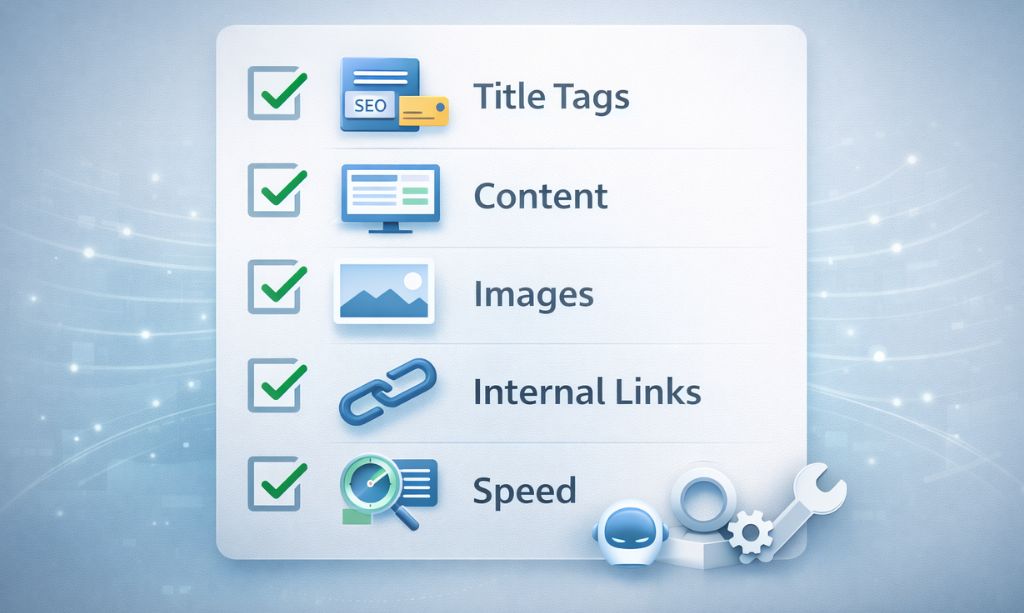
We’ve covered a ton of ground, and theory can only take you so far. Now, it’s time to move from the classroom to the cockpit.
This chapter is your pre-flight checklist.
It’s the simple, repeatable process you’ll follow every single time you create a new piece of content. This isn’t about being perfect; it’s about being consistent. In the world of on page SEO, it’s the consistent players who win the long game, and this checklist is designed to keep you in the game.
10.1 Pre-Publishing Content Checklist
Think of this as the blueprint phase of building a house. Mess this up, and the whole structure will be weak, no matter how good the furniture is later on.
- Survey the Neighborhood: Before you start building, check out the other houses on the block. What style is popular? In SEO terms, Google your keyword and see what format of content is already ranking. Match that style.
- Build the Best House: Your goal isn’t to build another cookie-cutter house; it’s to build the best one. Can you honestly say your content will be more valuable or easier to understand than what’s already there? If not, you’re building on the wrong street.
- A Welcoming Front Door: Is your introduction inviting? Does it immediately make a visitor feel like they’ve come to the right place to solve their problem?
- Clear Signage: Is your content easy to navigate with clear “signs” (headings and subheadings), or is it a confusing maze that will make visitors want to leave?
10.2 HTML Elements Checklist
This is your quick, behind-the-scenes quality control.
- Title Tag: Is it catchy? Is it under 60 characters? Is your main keyword near the front?
- Meta Description: Did you write a compelling “mini-ad” for your article that makes someone want to click?
- URL: Is it short, clean, and does it include your keyword?
- Image Alt Text: Have you given every image a simple, descriptive alt text?
- The “Sounds Human” Test: Read a few sentences out loud. Does it sound like a person talking, or like an instruction manual? Fix the robotic parts.
10.3 User Experience & Technical Checklist
This is about making sure your page isn’t annoying to use.
- Internal Links: Have you linked to 2-3 of your other relevant articles to guide the reader on their journey?
- External Links: If you’ve mentioned a specific statistic or study, are you linking out to the original source to show you’ve done your homework?
- The Mobile Test: Have you actually loaded the page on your phone? Does it feel natural, or are you forced into that awkward pinch-and-zoom dance just to read the text?
- The Speed Test: Are your images saved as modern file types (like .webp) and compressed so they don’t slow everything down?
10.4 Post-Publishing Performance Checklist
Your job isn’t over when you hit “publish.”
- Tell Google: Have you submitted the new URL through Google Search Console to ask for indexing?
- Tell People: Have you shared your new article with your social media followers or email subscribers?
- Build Foundational Links: Once your on-page optimization is complete, your next move is to gain initial authority. A manual Off Page SEO Directory Submission strategy is a perfect starting point to signal to Google that your content is trustworthy.
- Set a Reminder: Put a note in your calendar for 6 months from now to come back, review this page’s performance, and see if it needs a refresh.
- Uncover Hidden Gems: Once a month has passed, dive into your Google Search Console “Performance” report. What surprising search terms is your page showing up for? These are fantastic clues for future updates.
That’s it. It’s not about being perfect. It’s about building a solid process. Follow these steps consistently, and your on page SEO will get better and better. It’s guaranteed.
Still have a few questions? Let’s tackle them now in our FAQ.
Chapter 11: Answering Your Top On Page SEO Questions
We’ve navigated a lot of information, but I bet there are still a few questions nagging you. Let’s tackle the common ones I hear people ask about on page SEO.
11.1 “Okay, I’ve done the work. Now, what’s the real waiting time for on-page SEO?”
Ah, the million-dollar question. Anyone who gives you a specific date is selling you snake oil. The real, honest answer is that it’s a process of growth, not a flip of a switch.
Think of your on page SEO like planting a tree.
If you’re starting with a brand new website, you’re planting a tiny seed. It needs time to sprout, grow roots, and even be visible above the ground. You could be looking at 6-12 months before that seed turns into a sapling that provides any real shade (traction).
If you have an established site, you’re starting with a young tree. A little bit of pruning and watering (on page SEO tweaks) can lead to new growth and more fruit (results) in just a few weeks.
But in both cases, the health of your soil (the competitiveness of your niche), the age of your seed (your site’s authority), and how consistently you water it (the quality of your work) all play a massive role. It’s a game of cultivation, not a quick hack.
11.2 “After I optimize a page once, can I just consider it ‘done’ forever?”
My advice? Don’t go crazy with constant changes. Your initial on page SEO should be solid before you ever hit publish. After that, let it sit for a while.
A good rule of thumb is to revisit your most important articles once a year. Give them a “fresh coat of paint.” Update any old stats, add new insights, and make sure the content is still the best answer out there. If you notice an important page starting to slip in the rankings, that’s your cue to give it some attention.
11.3 “Can a beginner realistically do their own on page SEO?”
You can absolutely, 100% do this yourself.
Look, an expert can definitely speed things up, but the core principles of on page SEO are not rocket science. Everything in this guide is something you can learn and implement on your own.
Begin by dedicating your energy to what truly matters: creating insanely valuable content. Let a straightforward plugin like Rank Math or Yoast manage the more technical aspects for you. Don’t get stuck in analysis paralysis; the most crucial action is to start.
11.4 “What is the single most critical element of on page SEO in 2026?”
If I had to bet all my money on a single on page SEO factor for 2026, it would be user intent.
No question about it.
A page can be a technical masterpiece, but if it fails to align with what the searcher is truly trying to do, it’s worthless in Google’s eyes.
Google’s entire operation is built on one thing: user satisfaction. Your job as an SEO is to become an expert at decoding the “why” behind a search query and then delivering the most helpful answer. Everything else—keywords, links, and tags—is just there to support that main goal.
11.5 “What’s the deal with keyword density? Is that still a thing?”
Nope. Not in the old-school sense.
Forget about trying to hit some magic percentage of keywords in your text. That’s a relic of a bygone SEO era, and it will only make your writing sound like it was produced by a robot from the 90s.
Instead, just make sure your main keyword appears in a few logical, important places like your title and an early heading. From there, just write the best, most comprehensive article you can. If you do that, you’ll naturally use all the right related terms without even thinking about it. Focus on being thorough, not on hitting a number.
Chapter 12: Conclusion: Your Journey to On Page SEO Mastery Continues
And just like that, our deep dive comes to a close. If your brain feels a little full right now, that’s a good thing. It means you’ve been paying attention.
But don’t let it overwhelm you. The truth is, you now have a framework for on page SEO that most people in your industry will never bother to learn. You’ve traded guesswork for a real strategy. That alone is a massive advantage.
12.1 So, What’s the “Too Long; Didn’t Read” Version?
If this whole guide had to be boiled down to a few core ideas, these would be it:
- Be a detective about intent. Figure out what the searcher really wants before you do anything else.
- Create content you’re actually proud of. There’s no on page SEO trick that can save boring or unhelpful content.
- Make your site a pleasant place to be. Fast, mobile-friendly, and easy to navigate isn’t optional anymore.
- Just be consistent. Small, steady efforts over time will always crush a single, massive push for perfection.
12.2 The Future is Human
SEO is a world of constant change. New algorithms, AI Overviews… there will always be something new to talk about.
But here’s a little secret: the fundamentals rarely change. All of Google’s complex updates are just different ways of asking the same simple question: “Which result will make our user happiest?” Here’s the bottom line: if you make answering that question the absolute center of your on page SEO universe, you’ll always be moving in the right direction. Don’t chase algorithms. Chase real, human value.
12.3 Your Turn
This guide isn’t meant to be just another tab you close and forget. It’s a call to action.
So here’s what I want you to do. Not tomorrow, not next week. Right now.
Just pick one small thing from this guide and go do it. Rewrite one bad title tag. Compress one oversized image. Add a couple of internal links to an old post.
That’s it.
The path to the top of Google isn’t a single giant leap. It’s a series of small, deliberate steps. You’ve already crossed the starting line just by getting this far.
Now, go take the next. We’ll see you on page one.
For more actionable SEO guides and digital growth strategies, feel free to explore the rest of Total InfoHub. It’s time to claim your spot as a leader in your niche.